
The Receiver CCP
It all begins with an idea.
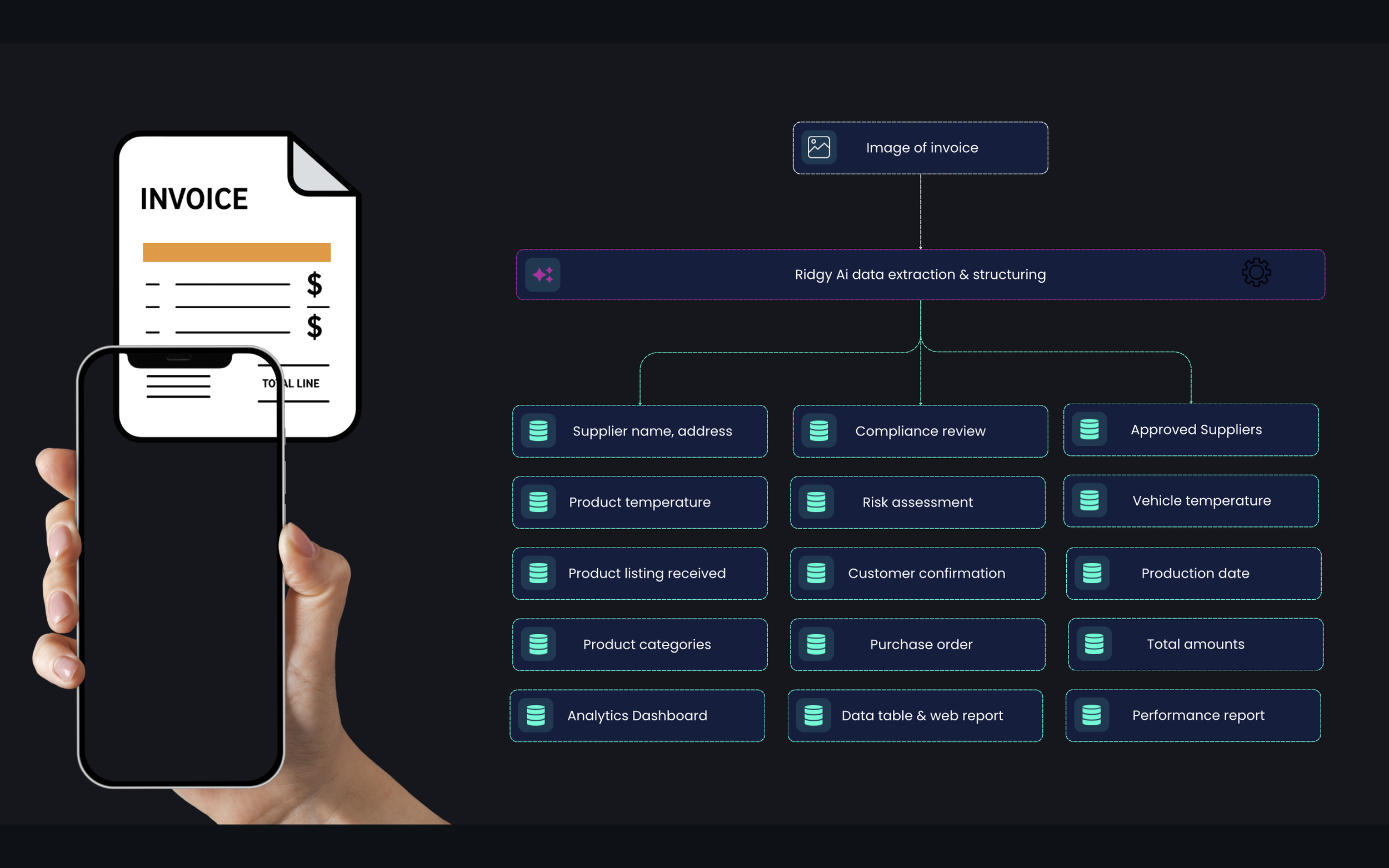
CCP1 Receiver makes incoming goods effortless. All your team needs to do is snap a photo of the invoice or delivery docket — one image or many, it doesn’t matter. From there, Receiver does the heavy lifting: extracting every key detail, from supplier info to product temps, and turning it into structured, reliable data.
No manual entry, no fuss.
That data then powers instant compliance checks, detailed reports, and smart business intelligence, so you can stay audit-ready and make sharper decisions. One picture in, powerful insights out — that’s Receiver.
The Receiver Flow
Incoming Goods 1
It all begins with an idea.
1. Workflow Overview
Upload
Staff upload invoice/docket images and related photos (goods, thermometers, vehicles).
AI Extraction
The AI reviews printed and handwritten information, then extracts structured data into the Incoming Goods Form.
Compliance Checks
The AI applies HACCP, ISO 22000, and jurisdictional food safety standards (FSANZ, SFA, BPOM, etc.) to determine acceptance.
Risk Assessment
A structured HACCP-style risk assessment is generated for each delivery.
2. Supplier Data
Supplier Name — Taken from invoice header.
Example: “Bidfood Australia Pty Ltd”
Sample Product — Chosen by:
Marked with * on goods list.
Single food item shown in images.
First product in goods list.
Example: “Chicken Breast Fillets 5kg”
Sample Temperature (🖊️ Handwritten)
Must be written on invoice/docket, ideally circled.
Taken from thermometer probe, docket notes, or handwritten figures.
Example: “4.2 ºC” or “Hard Frozen”
3. Items Data
Goods Received — List of all items, pulled from invoice lines and photos.
Example:
Copy
1. Chicken Breast Fillets — 2 × 5kg — $85.00
2. Roma Tomatoes — 10kg carton — $30.00
Product Categories — Each item mapped to category (e.g., Poultry, Fresh Produce).
Example:
Copy
Chicken Breast Fillets → Poultry
Roma Tomatoes → Fresh Produce
Production Date (🖊️ Handwritten)
Sometimes printed, often handwritten on docket/carton.
Format: DD-MM-YYYY
Example: “21-08-2025”
Product Temperature (🖊️ Handwritten)
Numeric values may be handwritten beside goods.
Example: “3.5 ºC”
Expiry Date (🖊️ Handwritten)
Expiry/use-by dates must be noted if visible.
Example: “21-09-2025”
Packaging Condition (🖊️ Handwritten if issues)
Mark “OK” or issue notes like “Bag torn”.
Example: “Rejected — Damaged carton”
Visual Assessment (🖊️ Handwritten if issues)
Notes like “Looks clean” or “Signs of contamination”.
Example: “Accepted”
4. Customer Data
Customer Name — Example: “Grand Hyatt Singapore”
Customer Address — Example: “10 Scotts Road, Singapore 228211”
Customer Account Number — Example: “ACC-10452”
5. Invoice Data
Invoice Number — Exact as printed.
Example: “INV-2025-00874”
Invoice Date — DD-MM-YYYY.
Example: “04-09-2025”
Purchase Order Number — Example: “PO-4455”
Supplier Address — Example: “123 Supply Rd, Sydney NSW 2000”
Time of Receivable (🖊️ Handwritten)
Required at delivery.
Write time goods are received, in hh:mm format.
Example: “09:45”
6. Vehicle Data
Vehicle Temperature (🖊️ Handwritten if not digital)
Write numeric storage temp (may or may not be circled).
Example: “-18.5 ºC”
Vehicle Condition (🖊️ Handwritten if issues)
Notes on cleanliness: “Clean” / “Dirty”.
Example: “Clean, orderly”
7. Financials Data
Subtotal — Example: $520.00
Tax Amount — Example: $52.00
Total Amount Due — Example: $572.00
Currency — Example: AUD
8. Compliance
Overall Compliance Verdict
Short statement: Accept / Reject / Conditional accept / Unclear.
Example:
“Reject — Chilled chicken 9.2 °C (>5 °C, AU/NZ FSANZ).”
Compliance Context (Jurisdictions)
Copy
AU/NZ — FSANZ Food Standards Code Std 3.2.2 cl 5
SG — SFA Environmental Public Health Regulations
MY — Food Hygiene Regulations 2009
ID — BPOM Good Circulation Practice
Regulatory Thresholds (ºC)
Copy
AU/NZ — Chilled ≤5; Hot ≥60; Frozen ≤−18
SG — Chilled ≤4; Frozen ≤−18; Hot ≥60
MY — Chilled −1…10; Frozen ≤−18; Hot ≥60
ID — Chilled 0–5; Frozen ≤−18
Compliance Citations
Copy
AU/NZ — Std 3.2.2 cl 5; FSANZ “Receiving food”
SG — SS 668:2020; EPHA Food Hygiene Regs
MY — Reg 36(1)(l),(m); Reg. 38(3)
ID — Gov. Reg. 86/2019; BPOM CPerPOB
Final Compliance Line
Example:
“SG — Compliant — Frozen prawns ≤−18 °C (−19.2 °C docket), packaging intact.”
9. Risk Assessment
The AI generates a HACCP/ISO 22000-aligned narrative covering:
Hazards (e.g., temp abuse, contamination)
CCP (receiving)
Critical Limits (chilled ≤5 °C, frozen ≤−18 °C)
Monitoring (invoice, thermometer, photos)
Verification (records cross-check)
Validation (scientific standards)
Corrective Actions (reject, segregate, escalate)
Example Excerpt:
Copy
Hazards: Risk of microbial growth due to elevated temp.
CCP: Temperature at receiving.
Critical Limits: Chilled ≤5 °C.
Corrective Action: Reject goods.

Conclusion: Non-compliant — Residual risk elevated.
10. Quick Reference
When signing in deliveries, always handwrite:
✅ Sample product temperature (circled)
✅ Vehicle temperature
✅ Time of receivable (HH:MM)
✅ Production date (if visible)
✅ Expiry date (if visible)
✅ Notes on packaging/visual issues
✅ Signature/initials
If missing, AI will return “Not Specified”, weakening compliance records.
✅ With this process, every delivery is verified against food safety regulations, ensuring unsafe goods are identified before they enter storage or kitchens.
Incoming Good 2
It all begins with an idea.
From Paper to Audit Compliance in Seconds
The goods receiving process (Critical Control Point 1/CCP1) is completely transformed into a robust, error-free digital workflow. The Didge Ridgy Vision AI solution acts as a second set of eyes, ensuring compliance from the loading dock to storage.
The workflow begins with a simple step:
Staff Upload the invoice/docket images along with supporting photos (goods, thermometer readings, vehicle condition). Ridgy Vision AI immediately takes over. Using advanced technology, the AI performs Data Extraction, reading every piece of information—both printed and handwritten—and structuring it into the digital Incoming Goods form.
Once data is extracted (including Supplier, Items Received and their categories, Customer, Financials, and Invoice Number), the AI initiates a Comprehensive Compliance Check. Each item is cross-referenced against global critical limits (HACCP, ISO 22000) and applicable local regulations (such as FSANZ, SFA, or BPOM). The result is a decisive Compliance Verdict—Accept or Reject—complete with citations of the specific violated regulation.
This process culminates in an automatically generated HACCP/ISO 22000-aligned Risk Assessment, summarizing hazards, critical limits, and mandatory corrective actions. This ensures you have a complete, defensible audit trail for every single delivery.
To ensure 100% accurate AI output and a strong audit trail, it is essential for on-site staff to manually record key data points on the physical docket upon receiving goods:
✅ Sample Product Temperature and Vehicle Temperature (ideally circled).
✅ Accurate Time of Receivable (HH:MM format).
✅ Production Date and Expiry Date (if visible).
✅ Notes on Packaging/Visual Condition (e.g., 'Damaged Carton' or 'Clean, orderly').
This clear handwritten information serves as a physical verification that strengthens the AI-extracted digital data, eliminating ambiguity and ensuring every delivery you accept has been strictly verified against food safety standards.
Incoming Good 3
It all begins with an idea.
From Paper to Audit Compliance in Seconds
The goods receiving process (Critical Control Point 1/CCP1) is completely transformed into a robust, error-free digital workflow. The Didge Ridgy Vision AI solution acts as a second set of eyes, ensuring compliance from the loading dock to storage.
The workflow begins with a simple step:
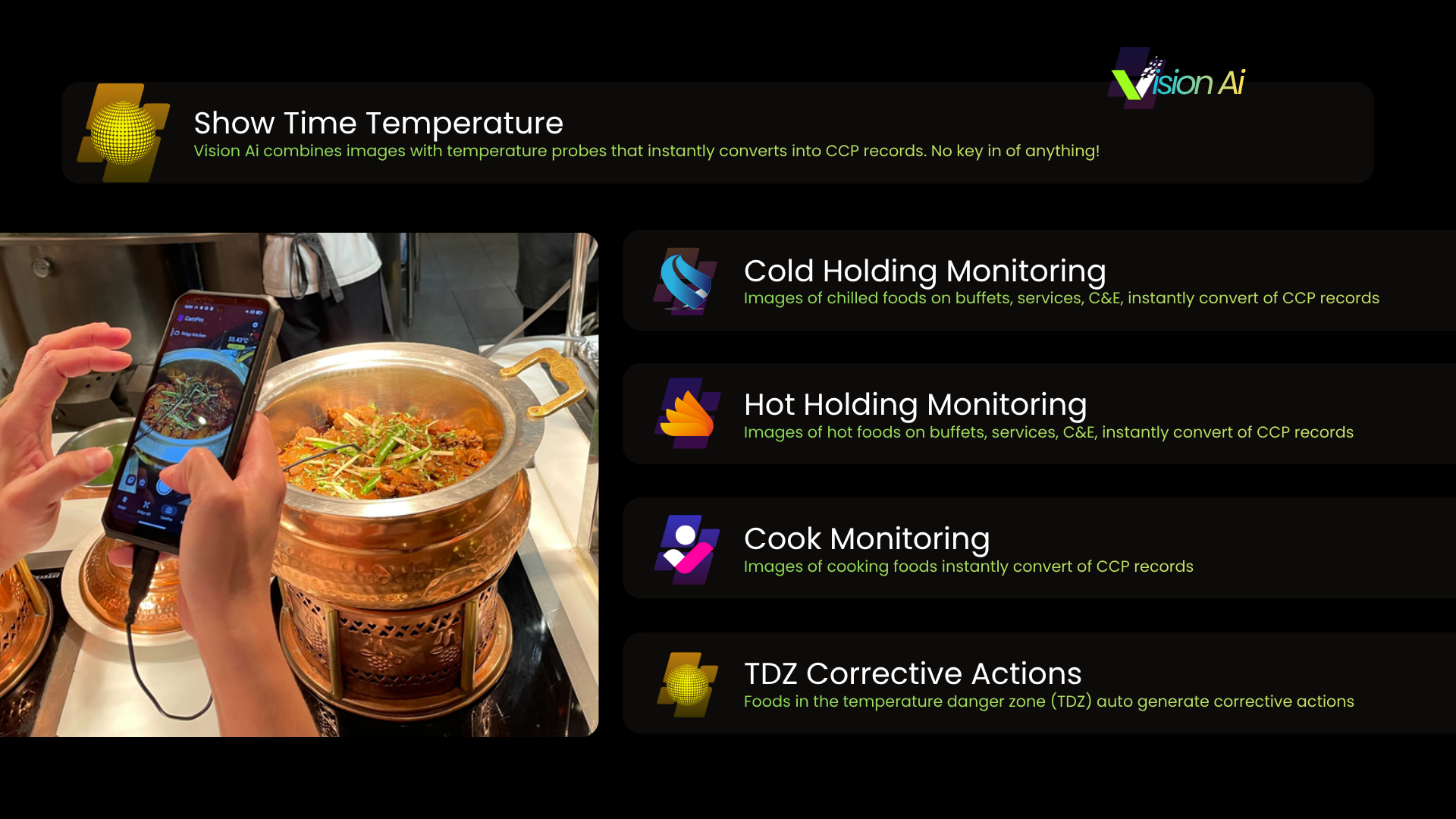
Staff Upload the invoice/docket images along with supporting photos (goods, thermometer readings, vehicle condition). Ridgy Vision AI immediately takes over. Using advanced technology, the AI performs Data Extraction, reading every piece of information—both printed and handwritten—and structuring it into the digital Incoming Goods form.
Once data is extracted (including Supplier, Items Received and their categories, Customer, Financials, and Invoice Number), the AI initiates a Comprehensive Compliance Check. Each item is cross-referenced against global critical limits (HACCP, ISO 22000) and applicable local regulations (such as FSANZ, SFA, or BPOM). The result is a decisive Compliance Verdict—Accept or Reject—complete with citations of the specific violated regulation.
This process culminates in an automatically generated HACCP/ISO 22000-aligned Risk Assessment, summarizing hazards, critical limits, and mandatory corrective actions. This ensures you have a complete, defensible audit trail for every single delivery.
To ensure 100% accurate AI output and a strong audit trail, it is essential for on-site staff to manually record key data points on the physical docket upon receiving goods:
✅ Sample Product Temperature and Vehicle Temperature (ideally circled).
✅ Accurate Time of Receivable (HH:MM format).
✅ Production Date and Expiry Date (if visible).
✅ Notes on Packaging/Visual Condition (e.g., 'Damaged Carton' or 'Clean, orderly').
This clear handwritten information serves as a physical verification that strengthens the AI-extracted digital data, eliminating ambiguity and ensuring every delivery you accept has been strictly verified against food safety standards.